
Content: Site Booster Module
The Ocean Site Booster's Content module gives you granular control over how visitors interact with your website’s front-end and how the browser handles specific link behaviors.
Note: The Content module requires Ocean Site Booster v1.3.0 or higher.
Getting Started
- Navigate to the Site Booster dashboard.
- Locate the Content panel in the main sidebar menu.
- Enable Content Module toggle at the top right and switch it to On.
- Configure your preferred settings (detailed below).
- Click Save Changes at the bottom of the page to apply your settings.
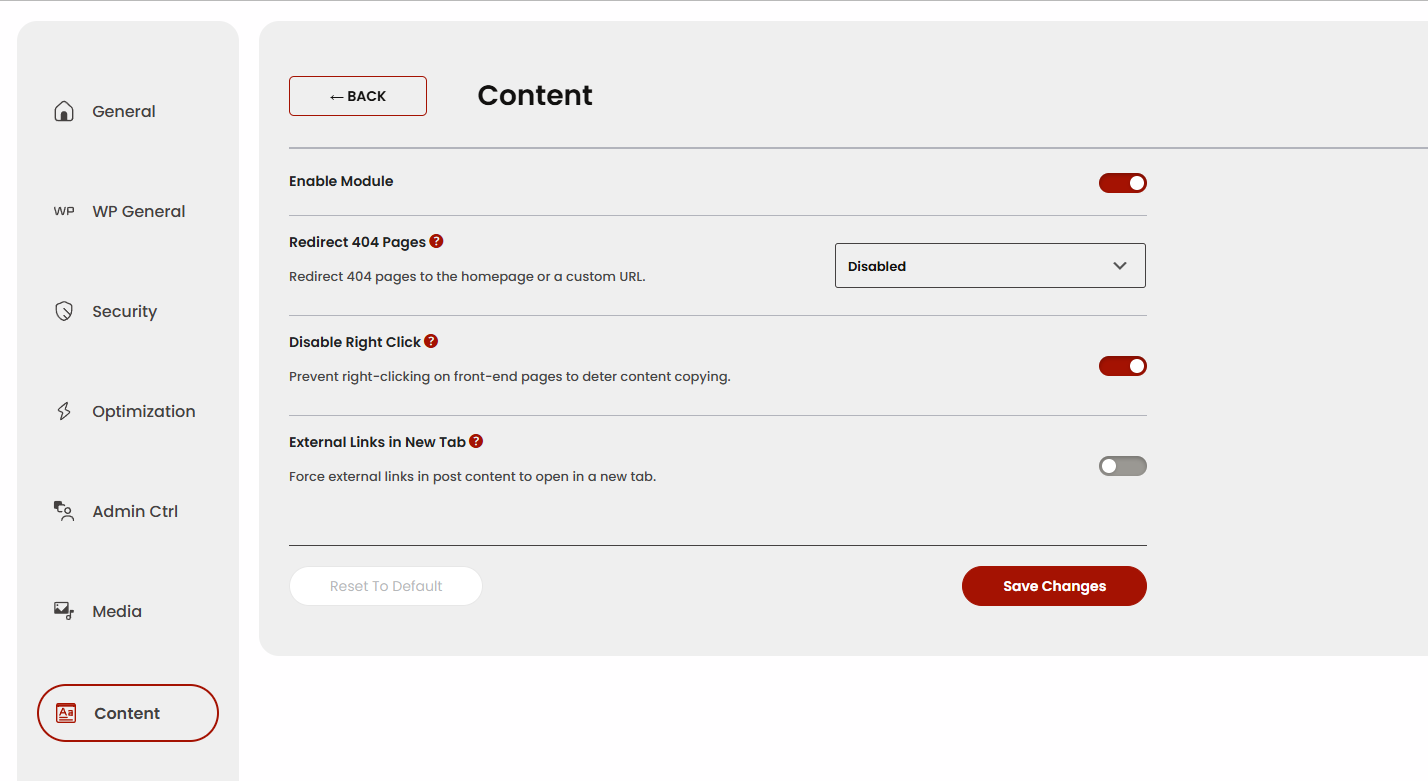
Available Content options include:
Redirect 404 Pages
This feature allows you to automatically redirect visitors who land on a "Page Not Found" (404 error) to a more useful destination. This is an excellent way to reduce bounce rates and keep users engaged if they click a broken or expired link.
- Disabled: Users will see your standard 404 error page.
- Homepage: Automatically sends users back to your main landing page.
- Custom URL: Opens an additional field to specify a unique destination.
- Custom Redirect URL: Enter the full URL (e.g.,
https://yoursite.com/resources) where 404 traffic should be sent.
- Custom Redirect URL: Enter the full URL (e.g.,
Disable Right Click
Enable this to prevent the right-click context menu from appearing on the front-end of your site.
- Purpose: Deters casual content theft (text copying or "Save Image As") and discourages users from easily inspecting your site's source code.
- User Experience: Note that this disables all right-click functions.
External Links in New Tab
When enabled, the module automatically adds the target="_blank" attribute to any link pointing to a different domain within your Post content (WP dashboard > Posts).
- SEO & Retention: Keeps your website open in the original tab, preventing users from completely leaving your site when clicking an external reference.
- Automation: Saves time by removing the need to manually toggle "Open in new tab" for every individual external link in the WordPress editor.
Found an error in this doc or believe it needs improvement?
Send us a prepurchase ticket, include the URL of the page, and add suggestions and more details about how we can make things better for you.
That's it!
Boost your WordPress website on all levels with OceanWP and Ocean Site Booster.