
Tools: Site Booster Panel
The Ocean Site Booster's Tool panel is a versatile collection of utilities designed to secure your site, streamline content creation, and simplify code management without the need for additional plugins.
Note: The Tools module requires Ocean Site Booster v1.3.0 or higher.
Getting Started
- Navigate to the Site Booster dashboard.
- Locate the Tools option in the main sidebar menu.
- Enable Tools Module toggle at the top right and switch it to On.
- Configure your preferred settings (detailed below).
- Click Save Changes at the bottom of the page to apply your settings.
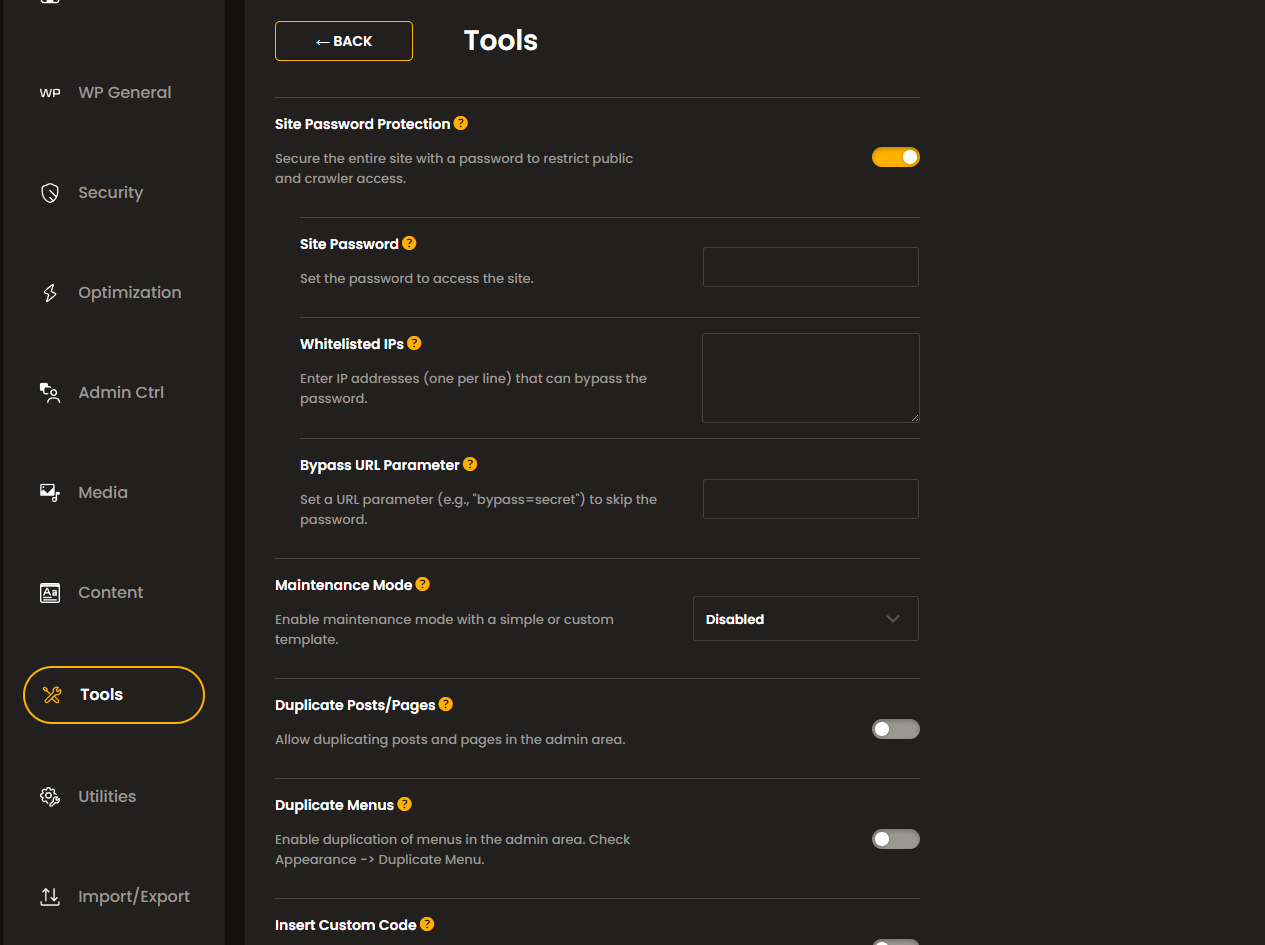
Available Tools options include:
- Site Password Protection,
- Maintenance Mode,
- Duplicate Posts/Pages,
- Duplicate Menus,
- Insert Custom Code.
Site Password Protection
Secure your entire website behind a password wall.
This is ideal for staging sites, internal wikis, or sites under development. This feature restricts access for both public visitors and search engine crawlers.
-
Site Password: Set the master password required to view the site.
Whitelisted IPs: Enter specific IP addresses (one per line) to allow them to bypass the password prompt automatically.
Bypass URL Parameter: A powerful alternative to IP whitelisting. Set a "key=value" pair to create a secret access link.
- Setup: Enter a string like
access=granted. - Usage: Access your site via
https://yourwebsite.com?access=granted. - Pro Tip: To bypass the password and go straight to the login screen, use
https://yourwebsite.com/wp-login.php?access=granted.
- Setup: Enter a string like
When accessing the login URL with the Bypass URL Parameter enabled, use the wp-login.php option.
Example: https://yourwebsite.com/wp-login.php?access=granted
Maintenance Mode
Inform visitors that your site is undergoing brief updates. This prevents users from seeing broken layouts during plugin updates or design tweaks.
- Disabled: Your website is available as usual.
- Simple Template: Customize a basic landing page with a Simple Heading, Simple Content message, and a Simple Background Image.
- Custom Template: Select a pre-made template from OceanWP > My Library.
- Note: Requires the OceanWP theme and Ocean Extra plugin.
The Custom Template option is currently available only to OceanWP theme users.
Duplicate Posts/Pages
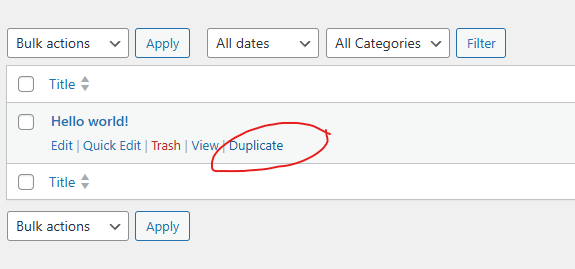
Duplicate Posts/Pages adds a "Duplicate" action link to your Post and Page rows in the WordPress admin area.
Duplicate Menus
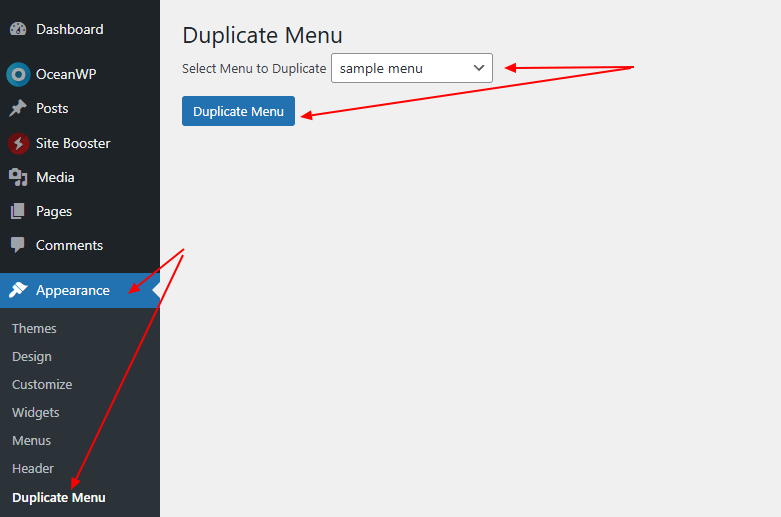
Duplicate Menus option enables a dedicated menu cloner.
Once enabled, go to Appearance > Duplicate Menu (refresh the page if you're not seeing the new option). Select your source menu, click Duplicate, and find the new copy under Appearance > Menus.
Insert Custom Code
Easily inject scripts (like Google Analytics, Facebook Pixel, or custom CSS/JS) into specific areas of your site's HTML without editing theme files.
Available options include:
- Header Code: insert code into the website's
<head>HTML element. Common use cases: Meta tags, Analytics, CSS. - Body Code: insert code right after the website's
<body>HTML element, aka website's<body>open tag. Common use cases: Tracking pixels, GTM snippets. - Footer Code*: insert code right before the website's
</body>HTML element, aka website's</body>closing tag. Common use cases: Heavy Javascript, Chat widgets.
Security Warning: Code entered here is not sanitized or escaped to ensure it functions correctly. Only paste code from trusted, verified sources.
*this name is not a mistake. The </body> HTML element (body closing tag) is the last part of the page before the document ends, therefore it's often referred to as the footer when it comes to code insertion/injection.
Found an error in this doc or believe it needs improvement?
Send us a prepurchase ticket, include the URL of the page, and add suggestions and more details about how we can make things better for you.
That's it!
Boost your WordPress website on all levels with OceanWP and Ocean Site Booster.