
SSL Manager: Site Booster Module
The Ocean Site Booster's SSL Manager module is a specialized diagnostic and configuration tool designed to optimize your website’s security layer. It ensures your existing SSL certificate is working correctly and fixes the "Mixed Content" errors that often trigger "Not Secure" warnings in browsers.
Note: The SSL Manager requires Ocean Site Booster v1.3.0 or higher.
Existing Certificate Required: The SSL Manager does not issue or install a new SSL certificate on your server. You must first obtain a certificate from your hosting provider (eg, Let's Encrypt) before using these management features.
Getting Started
- Navigate to the Site Booster dashboard.
- Locate the Utilities panel in the main sidebar menu.
- Enable SSL Manager Module toggle at the top right and switch it to On.
- Configure your preferred settings (detailed below).
- Click Save Changes at the bottom of the page to apply your settings.
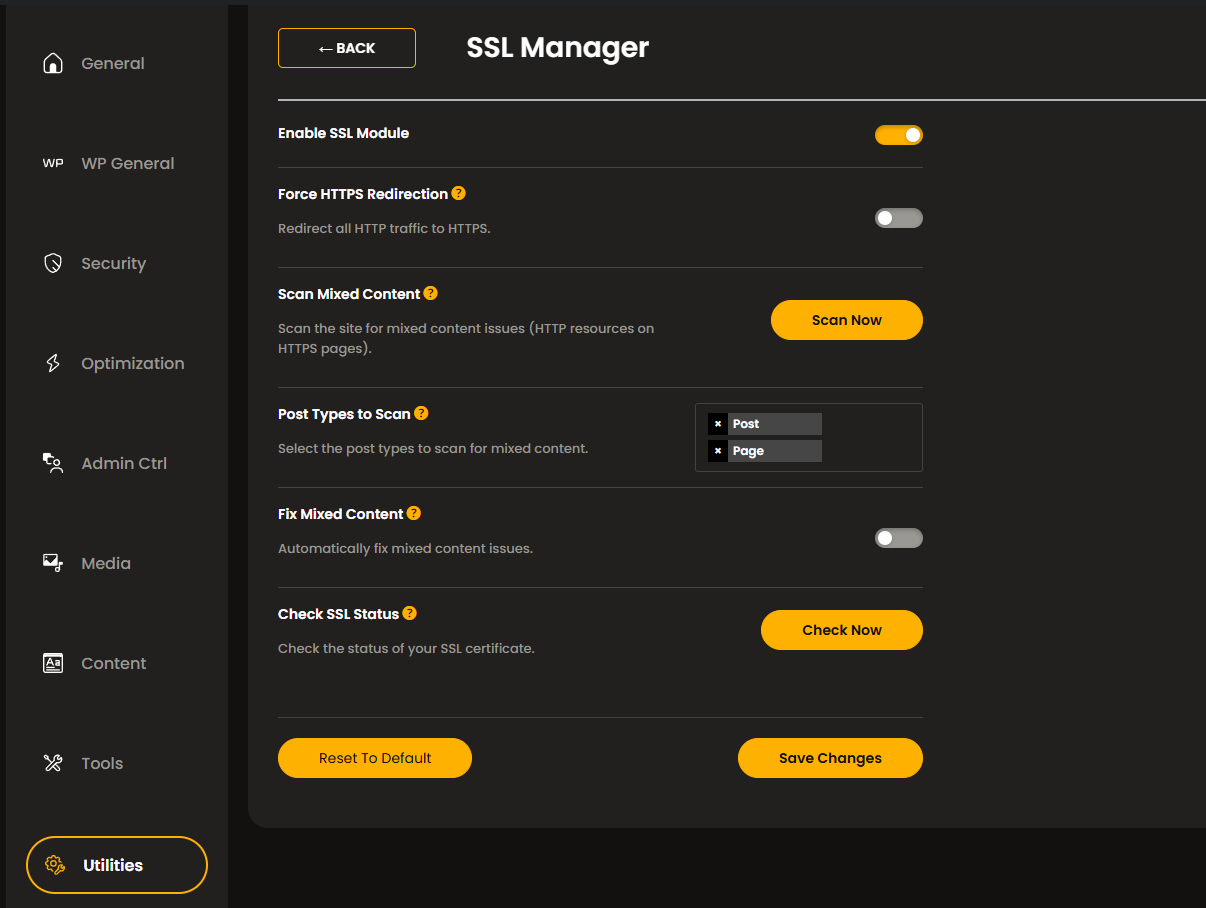
Available SSL Manager options include:
Force HTTPS Redirection
This feature ensures that any visitor attempting to access your site via an insecure link (eg, http://yoursite.com ) is automatically rerouted to the encrypted version (https://yoursite.com ).
- Benefit: Ensures all user data remains encrypted and provides a significant boost to your site's SEO ranking.
Any attempt to access your site over HTTP will be automatically redirected to the HTTPS version, ensuring all pages load securely.
Mixed Content Troubleshooter
Mixed content occurs when an encrypted (HTTPS) page attempts to load resources — like images, scripts, or styles — over an insecure (HTTP) connection. This can break your site's layout or cause browsers to block assets entirely.
1. Scan Mixed Content
Select the Scan Now button to perform a deep-dive of your site’s database to find insecure links.
2. Post Types to Scan
Post Types to Scan: Use this dropdown to narrow your search to specific areas like Posts, Pages, or other custom content types. This makes the scanning process faster and more efficient.
3. Fix Mixed Content
Once insecure links are identified, toggle this option to automatically update those legacy http:// links to https:// .
- Result: Cleans up your browser console warnings and ensures a "Green Padlock" appears for all visitors.
Check SSL Status
Use the Check Now button to instantly verify that your certificate is properly installed and currently valid.
- Usage: This is the first step in troubleshooting if your site suddenly displays security warnings related to SSL or repetitive issues.
Found an error in this doc or believe it needs improvement?
Send us a prepurchase ticket, include the URL of the page, and add suggestions and more details about how we can make things better for you.
That's it!
Boost your WordPress website on all levels with OceanWP and Ocean Site Booster.